
Ten tabs, Ctrl and a digit for each, Ctrl+` to go back
Sixteen views on one stream
Every decoded frame arrives in one place, and each view is a different reading of it. None of them knows a protocol: a DMR call, a TETRA call and an M17 call are the same row with different fields filled in, and an aircraft, a vessel and a mesh node are the same track.
The packet list runs along the bottom of all of them, newest last, with the selected burst’s envelope, instantaneous frequency and hex dump beside it. The top row of tabs is what the receiver can do and what it heard; the bottom row is who is out there. Calls shares its tab with the transcript, and Survey holds the six views of who is transmitting.
- 1
Dashboard
Where a receiver that has just started is: what the application can do, as cards that take you there, and once a radio is running what is tuned, whether the host is keeping up, how much has decoded and what is on the air right now.
- 2
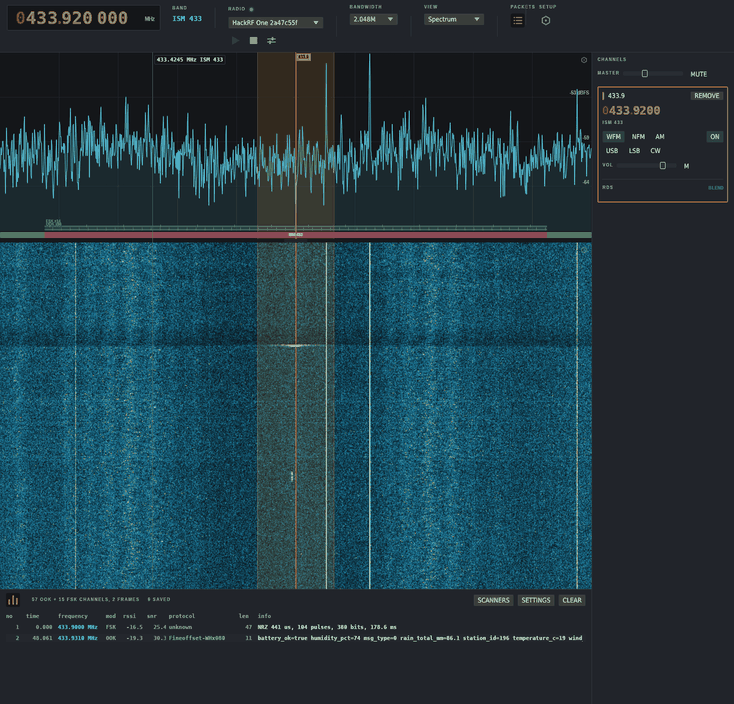
Spectrum
The span and its waterfall. Click to place a channel and listen, drag its passband edges to shape it, drag to pan, scroll to scrub, hold shift to snap to the band plan. The span can be kept as readings and exported as a heatmap page that zooms and pans, with time, frequency and decibels under a crosshair.
- 3
Signal chain
The graph the receiver is running, drawn, with each stage saying what it has been doing and how long it takes. Stages are dragged in from a searchable list onto a port or a wire, a switch turns one off or all of receive with transmit left on, and a stage left out says why. A transmitter is the same graph with the arrows the other way.
- 4
Calls
Who is talking, on anything that decodes speech. Picking a call is asking to hear it, every over can be recorded as Opus, and a timeline under the list draws the recordings against the clock so a stretch can be dragged out as one file. A call several sites carry at once is one row with every site on it.
- 4
Transcript
Beside the calls: what a local model read off everything heard, newest at the bottom, a line marked as it grows and a low-confidence reading flagged. Whisper in every size or Qwen3-ASR, on the CPU or a named GPU.
- 5
Messages
Everything carrying text, whether it came from a pager capcode, a TETRA talkgroup, a mesh channel, an RTTY over or a Morse key. The same words twice inside two minutes are one message with a count, because a pager sends every page twice.
- 6
Video
Whatever picture is on the span: an analogue camera, an SSTV transmission drawing line by line, a weather satellite pass building up in strips, or a service off a DVB-T or DVB-S2 multiplex. One programme table covers every multiplex, with scrambling, codecs and now and next, and an overlay like a set top box banner names what is showing.
- 7
Map
Anything that said where it was: aircraft, vessels, vehicles, mesh nodes, radiosondes, distress beacons and satellite ground tracks on OpenStreetMap tiles, with layers for cell towers, located transmitters and the public tuners, which CONNECT opens as radios. A hollow mark came from a single frame and never joins a trail; range rings are drawn around the antenna, not the window.
- 8
Devices
The first of the Survey tab. One row per transmitter that identified itself rather than one per transmission: what it called itself, who made it, the strongest level it was ever heard at, when it was last heard. Selecting a row draws its sightings on the map, and a drive exports as WiGLE CSV.
- 8
Trilateration
The transmitters the survey has placed, tightest first. Each has been heard from enough different places to be put on the map within the accuracy you choose, and a sighting is only kept from somewhere not yet heard from, so a parked receiver never places a transmitter on itself.
- 8
Data links
Who is talking to whom, on every protocol at once. Wireshark’s conversation list for radio: pick a link and the packets it carried open underneath, with the payload where the protocol gives one in the clear.
- 8
Channels
What is sitting on each Wi-Fi, Bluetooth and 802.15.4 channel, how loud it is and how crowded the channel is, which is the view that says where to put your own network.
- 8
Control
Where the sticks are on every model control link in earshot: a bar per channel in microseconds, the frame rate, the level, and whether the handset is asking to arm.
- 8
Keys
A row per enciphered channel and what is known about its key. The monitor is always there; decryption and key recovery need the tea feature.
- 9
Satellites
The one view showing something nobody has heard yet: every pass over the station in the next day, with peak elevation, a sky plot, live az/el and Doppler, and how stale the elements are. The pointing window aims a dish or a patch at any satellite, geostationary ones included, with LNB skew and a level to peak on.
- 0
Agent
A model with the run of the receiver, and what you asked it. Every run serves MCP on the loopback, so what the agent tunes, opens, rewires or changes in the settings happens in this window.
The use cases are the jobs these views get used for, from a device survey to letting an agent drive the radio.
Plug in a radio and press play.
It opens on the dashboard, and the dial starts at 433.92 MHz where the devices it decodes are.
Download WaveShark